Tools & Accessories
8.1 Accessories and Tools Overview
A successful deployment of the critical data transmission security system requires not only the core appliances and supporting infrastructure, but also a carefully selected set of physical accessories, cabling, power infrastructure, and deployment tools. Missing or incorrect accessories are a common cause of installation delays and post-installation issues. This chapter provides a complete bill of materials (BOM) covering all accessories required for a standard deployment, organized by category for easy procurement and inventory management.
The accessories illustrated below represent the complete set required for a standard three-rack deployment. Organizations deploying in different configurations should adjust quantities accordingly, using the per-rack and per-device multipliers provided in the BOM table.
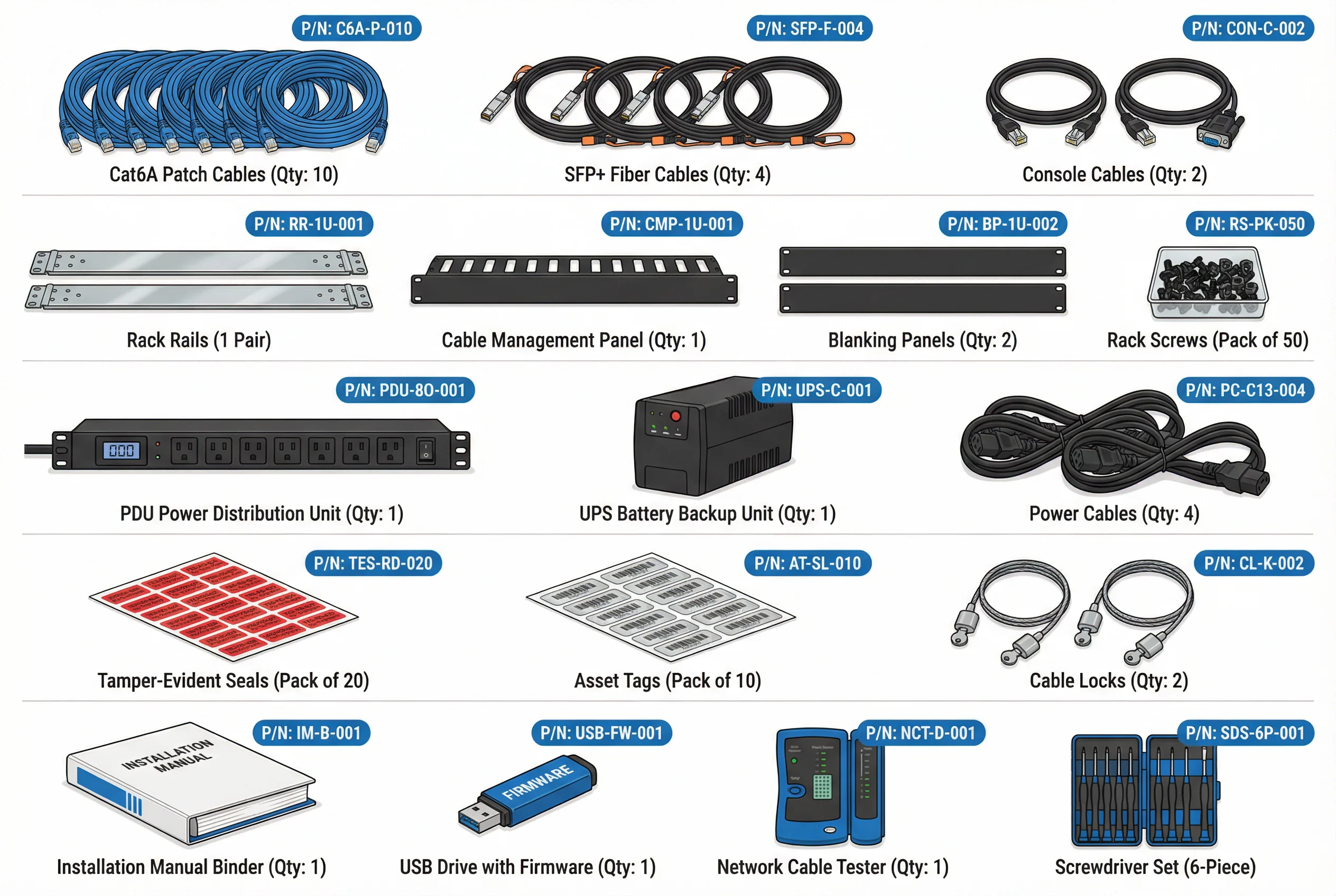
8.2 Complete Bill of Materials (BOM)
The bill of materials below provides a comprehensive list of all accessories required for a standard deployment. Quantities are specified for a three-rack, medium-enterprise deployment. Adjust multipliers for smaller or larger deployments as noted in the multiplier column.
| Category | Item | Part Number | Specification | Qty (3-Rack) | Unit | Notes |
|---|---|---|---|---|---|---|
| Network Cables | Cat6A Patch Cable | C6A-P-010 | Cat6A, 1m, blue (mgmt) / orange (prod) | 30 | Each | 10 per rack; color-coded by network |
| SFP+ DAC Cable | SFP-D-001 | 10G DAC, 1m, passive | 8 | Each | Inter-rack and uplink connections | |
| Console Cable | CON-C-002 | RJ45-to-DB9, 1.8m | 6 | Each | 2 per rack; one spare per rack | |
| Rack Hardware | Rack Rail Kit | RR-1U-001 | Universal 1U sliding rails, 19" | 10 | Pair | One pair per 1U/2U appliance |
| Cable Management Panel | CMP-1U-001 | 1U horizontal cable manager, 10 rings | 6 | Each | 2 per rack | |
| Blanking Panel | BP-1U-002 | 1U blanking panel, plastic | 15 | Each | Fill all empty rack units | |
| Rack Screws | RS-PK-050 | M6 rack screws with washers, pack of 50 | 3 | Pack | 1 pack per rack | |
| Power | PDU (Rack Power) | PDU-8O-001 | 1U rack PDU, 8-outlet, metered, C13/C14 | 6 | Each | 2 per rack (dual-feed) |
| UPS Battery Backup | UPS-C-001 | 2U rack UPS, 1500VA, pure sine wave | 3 | Each | 1 per rack; 10-min runtime at full load | |
| Power Cable (C13-C14) | PC-C13-004 | IEC C13-C14, 2m, 10A | 20 | Each | One per device power supply | |
| Security | Tamper-Evident Seal | TES-RD-020 | Red tamper-evident label, pack of 20 | 3 | Pack | Apply to all appliance chassis screws |
| Asset Tag | AT-SL-010 | Sequential numbered labels, pack of 10 | 3 | Pack | One per appliance; record in CMDB | |
| Cable Lock | CL-K-002 | Kensington-compatible cable lock, 2m | 6 | Each | Secure portable devices and laptops | |
| Tools & Docs | Installation Manual | IM-B-001 | Printed installation guide binder | 2 | Each | 1 for installation team, 1 for archive |
| Firmware USB Drive | USB-FW-001 | USB 3.0, 32GB, pre-loaded with firmware | 2 | Each | Primary + backup; verify hash before use | |
| Network Cable Tester | NCT-D-001 | Cat5e/6/6A + fiber tester, digital display | 1 | Each | Verify all cable connections post-install | |
| Screwdriver Set | SDS-6P-001 | 6-piece precision set (PH1, PH2, T10, T15, T20, flat) | 1 | Set | Required for rack mounting and chassis access |
8.3 Procurement and Inventory Checklist
Before beginning installation, verify that all items in the BOM have been received, inspected, and checked against purchase orders. The checklist below provides a structured pre-installation verification process to prevent delays caused by missing or incorrect accessories.
| # | Checklist Item | Verification Method | Responsible Party | Status |
|---|---|---|---|---|
| 1 | All BOM items received and counted | Physical count vs. purchase order | Logistics / Procurement | [ ] Complete |
| 2 | Cable lengths verified for rack layout | Physical measurement against rack diagram | Installation Engineer | [ ] Complete |
| 3 | Firmware USB hash verified | SHA-256 checksum vs. vendor-provided hash | Security Engineer | [ ] Complete |
| 4 | UPS load capacity verified | Calculate total device wattage vs. UPS rating | Facilities / Engineer | [ ] Complete |
| 5 | Rack space confirmed (U count) | Physical rack survey vs. rack diagram | Installation Engineer | [ ] Complete |
| 6 | Power circuit capacity confirmed | Electrician sign-off on circuit amperage | Facilities | [ ] Complete |
| 7 | Asset tags recorded in CMDB | CMDB entry created for each asset | IT Asset Manager | [ ] Complete |
| 8 | Tamper-evident seals applied post-install | Visual inspection; photograph for records | Security Engineer | [ ] Complete |